Mob City Game - Free Shooting Action in Your Browser
Mob City is a free shooting game that runs directly in your web browser on desktop and mobile devices. You take on missions to fight crime in a cartoon city, driving vehicles and wielding weapons to complete objectives. It's a fast-paced action experience with slow-motion mechanics and destructible environments, playable instantly without downloads.
What Is This Game
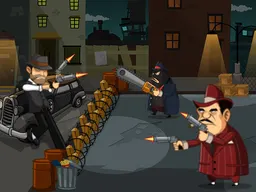
Mob City drops you into a cartoon crime-filled metropolis where your job is simple: complete missions and clean up the streets. You'll drive cars through the city, jump out, and use a variety of weapons to take down enemies. The core loop involves accepting objectives, navigating to locations, and using tactical shooting combined with vehicle controls to accomplish goals. The game runs at 960x600 resolution, which means it plays smoothly on both computer monitors and phone screens without any lag or sizing issues. Unlike games that require downloads or installations, Mob City loads directly in your browser—no launcher, no waiting for updates, no space taken on your device. The cartoon art style keeps things readable even during intense action sequences, and the city itself becomes your playground. Early missions teach you the basics: how to move between cover, when to use slow-motion to line up difficult shots, and which weapons suit different enemy types. The progression is designed so that later missions feel genuinely harder, not because the game is unfair, but because enemy placement and objective design improve.
Is It Worth Playing
If you enjoy shooting games with vehicle mechanics, Mob City delivers exactly what it promises without bloat. The slow-motion mechanic is the real hook here—it's not just a visual effect, it fundamentally changes how you approach combat. A shot that feels impossible at normal speed becomes manageable when time crawls. This creates moments where you feel genuinely tactical rather than lucky. The weapon variety matters too. Cycling between tools using your keyboard lets you match your arsenal to what the situation demands. Some enemies are easier to take down with grenades, others require accurate gunfire. That decision-making is what separates players who struggle at mission five from those who breeze through. The game is free, loads instantly, and respects your time by letting you play in ten-minute bursts or longer sessions. There's no energy system, no pay-to-win mechanics, no constant popups asking for money. You get a complete shooting experience without the friction that plagues many browser games. The main question is whether cartoon-style action and vehicle combat appeal to you. If third-person shooters or action games generally hold your interest, this is worth thirty minutes of your time to find out.
How to Get Started
Launch the game in your browser and you'll find yourself in the city almost immediately. The first mission is a tutorial in disguise—it teaches you movement, jumping, and basic combat without feeling like a lecture. You'll get a car and learn that driving is separate from shooting; you need to exit the vehicle to use weapons, which adds a layer of strategy to every approach. The game doesn't overwhelm you with choices at the start. You have one weapon, one car, one objective. Complete it, and the next mission introduces new tools or challenges. By mission three, you're managing weapon selection and slow-motion usage simultaneously, which is when the skill expression really begins. The missions are bite-sized enough that you can complete one in five to ten minutes, making it ideal for gaming sessions of any length. If you fail a mission, you restart from the beginning of that objective, not the entire game—this respects your time and keeps frustration from building. The city layout becomes familiar quickly. You'll recognize streets, landmarks, and enemy spawn patterns after a few playthroughs, which actually helps you execute more efficiently on subsequent attempts.
Controls
Desktop controls use a standard keyboard and mouse setup. Movement uses WASD keys—W forward, A left, S backward, D right. Spacebar makes your character jump, which you'll use to climb obstacles and evade fire. Left Shift activates slow-motion, slowing everything around you for a few seconds to help line up shots or dodge incoming grenades. Q and E cycle through your available weapons, letting you swap between guns and grenades without a menu. Left mouse click fires your current weapon. Right mouse click throws grenades when you have them equipped. Tab pauses the game, essential for taking a breath during intense moments. Mobile and touchscreen versions adapt these controls to your device. Movement typically uses directional buttons on the left side of the screen, with action buttons on the right for jumping, shooting, and weapon cycling. The 960x600 resolution means the interface scales cleanly to phone screens without shrinking buttons to unusable sizes. Touch controls take some adjustment if you're used to mouse-based shooting, but the slow-motion mechanic actually makes precision easier by giving you more time to aim before firing.
What Changes Over Time
Early missions introduce you to the city's mechanics one at a time. You learn to drive, then to shoot, then to combine both skills. Around mission five, the game stops holding your hand. Enemy placement becomes more aggressive. Objectives require you to navigate through multiple firefights rather than isolated encounters. The weapons you unlock expand your tactical options—grenades become crucial for flushing enemies from cover, and later-tier guns demand more careful aim but deliver more impact. Mission difficulty doesn't escalate through artificial bullet-sponge enemies; instead, the game places opponents smarter, uses the environment better, and combines multiple threats simultaneously. You might face an armored opponent protecting an objective while snipers fire from rooftops. That requires you to use slow-motion for positioning, grenades for the armor-plated threat, and cover awareness to keep yourself alive. The city itself doesn't change in dramatic ways, but as you complete objectives, you gain familiarity with layouts, which changes your approach strategy. A shortcut you didn't notice on your first try becomes a reliable path on your second. Enemy patterns that seemed random reveal their logic once you've died to them twice. This is where the skill progression becomes visible—not through your character getting stronger, but through your understanding of the game's systems deepening.
Mistakes That Cost You
The biggest mistake is rushing into an objective without understanding the layout. Mob City punishes exposed movement. Standing in the open while enemies have line of sight gets you killed quickly. Cover is your lifeline, and learning to use it—moving between points, using corners to shield yourself, timing your exits—separates successful runs from failures. Another costly error is weapon mismanagement. You have limited ammunition and multiple weapon types. Burning through your best gun on weak enemies leaves you underpowered for tougher encounters. The game teaches this through failure—a few runs where you run out of grenades teaches you to reserve them for armored threats. Don't waste slow-motion on minor fights. The mechanic feels so good that players often activate it reflexively, but it has cooldown or duration limits. Using it on easy encounters means it won't be available when you face the real challenge later in the mission. Vehicle positioning matters too. Leaving your car in the middle of an objective zone blocks your own exits and gives enemies clear shots at you. Park at the mission boundary and approach on foot so you maintain control and escape routes. Finally, patience wins firefights. This isn't a game where you spray bullets and hope for hits. Slow-motion exists because precision matters. Taking three seconds to line up a shot beats firing eight bullets wildly.
Where and What Device to Play
Mob City runs in any modern web browser on desktop—Chrome, Firefox, Safari, Edge, all work identically. There's nothing to install. Type the URL, click play, and you're in the game within seconds. No account creation required unless you want to save progress across sessions. On mobile, the experience is equally smooth. The 960x600 resolution is specifically optimized for phones, meaning the game scales to fit your screen without becoming tiny or requiring awkward zooming. Whether you're playing on a 27-inch monitor, a laptop, or a phone held in portrait or landscape, the interface adapts. You can play anywhere with internet—at home, on a break at work, on a train, at a café. The game doesn't demand a powerful computer. If your browser can play YouTube videos smoothly, it can run Mob City. There's no performance degradation on older devices; the cartoon style and optimized resolution mean consistent frame rates. Your phone won't heat up, your battery drain will be minimal, and you won't face lag even on weaker connection speeds. This is the entire appeal of browser games—full entertainment without installation overhead or device strain.
Controls
Keyboard and mouse
- W - Move forward
- A - Move left
- S - Move backward
- D - Move right
- Spacebar - Jump
- Left Shift - Activate slow-motion
- Q and E - Cycle through weapons
- Left Mouse Click - Shoot
- Right Mouse Click - Throw grenade
- Tab - Pause game
Touch
- Directional buttons (left side) - Move your character
- Jump button (right side) - Jump over obstacles
- Shoot button (right side) - Fire your current weapon
- Weapon cycle buttons (right side) - Switch between guns and grenades
- Slow-motion button (right side) - Activate slow-motion effect
- Pause button (top) - Pause the game
FAQ
- Do I need to download anything or create an account to play?
- No. Open your browser, navigate to the game, and play instantly. No downloads, no launcher, no account required to start playing. If you want to save your progress across multiple sessions, you can create an account, but it's optional.
- What's the point of slow-motion and when should I use it?
- Slow-motion is a mechanic that slows down everything around you for a few seconds, giving you time to line up shots or dodge incoming fire. Use it during tough firefights where enemies have strong accuracy or when you need precision to hit a small target. Don't waste it on easy encounters—save it for moments that feel impossible at normal speed.
- Can I play this on my phone?
- Yes. The game is designed to work on both desktop and mobile. The 960x600 resolution scales perfectly to phone screens, and touch controls replace keyboard and mouse inputs. Portrait or landscape orientation both work.
- How do I decide when to use grenades versus guns?
- Grenades are best for enemies behind cover or armored threats that take many bullets to kill. Regular guns work fine for standard enemies. Early missions give you plenty of ammo, so experiment. By mission five, ammo becomes more limited, forcing you to think strategically about which weapon suits each threat.
- What happens if I fail a mission?
- You restart that mission from the beginning. You don't lose progress toward other missions. This means you can retry as many times as you need without penalty—it's about learning the layout and enemy patterns until you succeed.
- Is there a story or just missions?
- The game centers around completing missions in a crime-filled city. Each mission is an objective you need to accomplish, and together they form your progression through the game. The focus is on gameplay and action rather than dialogue or plot.
- Do I need a good computer to play this?
- No. If your browser can play YouTube videos, it can run Mob City without issues. The cartoon graphics and optimized resolution mean it runs smoothly on older computers and laptops, and won't cause your device to overheat or drain battery quickly.
Similar games
More Shooting Games games →