Color Line - Free Hypercasual Game Online
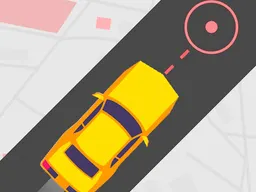
Color Line is a free hypercasual action game you play instantly in your browser on desktop, tablet, or mobile—no download needed. You control a color cube navigating toward its destination while avoiding obstacles that block the way. The gameplay is straightforward: reach the end of each level without crashing, but the path gets trickier as you progress.
About the Game
Color Line strips hypercasual gaming down to its core: movement, obstacles, and the pressure of staying on track. You're piloting a color cube through a series of increasingly difficult routes. Each level has a clear goal—get from point A to point B—but the obstacles scattered along the path demand precision and timing. The cube responds immediately to your input, so every crash is on you, not the controls. That immediate feedback is what keeps hypercasual players coming back for one more try. The game's simplicity is deceptive. The first few levels feel manageable, almost too easy. Then the paths narrow, obstacles multiply, and you realize you need to think two moves ahead. It's the classic hypercasual formula: easy to learn, hard to master. Each run lasts only seconds, which makes the game perfect for quick gaming sessions between other activities. There's no story, no cutscenes, no grinding for currency—just you, the cube, and the obstacle course.
How to Play
Your objective is to guide the color cube safely to the destination marker at the end of each level. The cube moves through a confined space where obstacles appear as barriers, walls, or hazards that block certain paths. You need to navigate around them without touching them. Each time you hit an obstacle, that run ends and you restart from the beginning of the level. There's no lives system or health bar—one collision means restarting. The levels are short enough that restarting doesn't feel punishing; it's just another attempt. As you progress through the game, the difficulty ramps up in predictable ways: paths get narrower, obstacles appear more frequently, or the cube's movement becomes trickier to control. The pacing ensures that players who grasp the basic mechanics in level one can still find challenge by level five. Completing a level unlocks the next one, so your progression is linear but steady. The game doesn't explain complex rules because there aren't any—what you see is what you get.
Controls
Desktop: Use arrow keys or WASD to steer the color cube left, right, up, and down. Hold the key in the direction you want to move. Release to stop. Mobile and tablet: Tap and drag your finger to move the cube in the direction you want. The on-screen movement responds to your touch in real time. Both control schemes are designed for quick, reactive input. There's no button for jumping or special actions—movement is all you need. The controls feel responsive on both platforms, though mobile players may find the touch input slightly more intuitive since it lets you swipe in any direction fluidly. Desktop players get the precision of keyboard input, which is useful when paths narrow and margins for error shrink.
Tips to Score Higher
Anticipate the path ahead. Don't react to obstacles as you reach them; start moving before you get close. The cube needs time to change direction, so early input beats last-second steering. Memorize the level layout. After your first or second attempt, you'll know where obstacles are placed. Use that knowledge to plan a smooth route rather than zigzagging constantly. Smooth movements score better than frantic ones. In hypercasual games like this, efficiency counts. Move at a steady pace rather than rushing and crashing, then waiting for the restart animation. Some levels have multiple safe paths. Experiment with different routes during your first few attempts, then commit to the one that feels most natural to your playstyle. Once you find a rhythm that works, stick with it. Avoid the urge to overthink. This is a game about instinct and quick reflexes, not complex strategy. Trust your first impression of a path and act on it.
Advanced Moves
As you master the basics, you'll discover subtle optimizations. The cube's movement speed is constant, but the direction of your input changes how quickly you can reposition. Tap brief directional inputs to make small corrections rather than holding keys for full movements. This technique lets you navigate tight spaces where a full swipe would overshoot. Some obstacles leave gaps. Rather than taking the wide route around them, threading through the gap saves time and demonstrates map control. This approach rewards players who study the level carefully. Combining multiple directional changes in rapid succession creates smoother trajectories through complex sections. Instead of moving horizontally, then vertically, try moving diagonally by pressing two keys or swiping in a diagonal direction. The cube's response time is fast enough that fluid, chained movements become possible with practice. Players who reach this level stop reacting to obstacles and start choreographing their entire run from the start.
Modes and Levels
Color Line delivers its content through a straightforward level progression. You start at level one and unlock new levels by completing the one before it. Each level introduces new challenge types: narrower corridors, more densely packed obstacles, faster-paced sections, or combinations of the above. The level design respects the hypercasual format—no level should take more than a minute to complete once you know the route, but earning that knowledge takes several attempts. There's no separate survival mode, time attack, or leaderboard, so the game stays focused on the core loop: attempt, fail, retry, succeed, advance. This streamlined approach works for hypercasual games because the fun comes from the incremental difficulty curve, not from competing against other players or chasing high scores in multiple modes. Each level is a self-contained challenge that teaches you something new about control and navigation.
Who This Game Is For
Color Line suits anyone looking for a quick, challenging game that doesn't demand hours of commitment. Hypercasual fans who love games like Flappy Bird or Crossy Road will recognize the design philosophy: simple rules, escalating difficulty, and the compulsion to try just one more time. Mobile gamers appreciate that it works flawlessly on phones and tablets without needing an app installation. Desktop players enjoy the precise keyboard controls during work breaks or downtime. Casual gamers who don't identify as hardcore find the game accessible—there's no jargon, no tutorials longer than thirty seconds, no grinding. Competitive players may skip it since there's no multiplayer or ranking system, but anyone who enjoys testing their reflexes and coordination will find plenty to engage with. The game also works for players who want a palette cleanser between longer, story-driven titles. You can play one level or ten without any sense of obligation or incomplete narrative. It's gaming without friction.
Controls
Keyboard and mouse
- Arrow keys or WASD to move the color cube in any direction
- Press and hold to move continuously, release to stop
- Navigate around obstacles to reach the destination
Touch
- Tap and drag your finger to move the cube in the desired direction
- Swipe smoothly to navigate around obstacles
- Release to stop moving
FAQ
- Is Color Line really free?
- Yes. Color Line is completely free to play in your browser with no download required. You can play as many levels as you want without paying anything.
- Does it work on my phone?
- Yes. Color Line runs on any device with a modern web browser, including smartphones and tablets. Touch controls are fully supported, so mobile play is smooth and responsive.
- What happens when I hit an obstacle?
- The level restarts immediately. You go back to the starting position and try again. There's no penalty beyond restarting, so failing is just part of the learning process.
- How many levels are there?
- The game has multiple levels that increase in difficulty as you progress. Each new level introduces fresh obstacle patterns and tighter navigation challenges. You unlock levels by completing the previous one.
- Can I play Color Line offline?
- Color Line requires an internet connection to play since it runs in your browser. As long as you're connected, you can play anytime without downloading anything.
- Is there a time limit in each level?
- No. You can take as much time as you need to navigate each level. The focus is on precision and avoiding obstacles, not on speed.
- Can I pause the game?
- Game mechanics are straightforward and levels are short, so pausing isn't typically necessary. If you need to stop, simply step away—restarting a level only takes a few seconds anyway.
Similar games
More Hypercasual Games games →